The ODB™ a CPQ Tool for Magento
It's so much more than a Super-fast, PCI compliant order and quote dashboard.
The ODB solves so many common MOTO order issues for eCommerce businesses that it wouldn't fit into one snappy headline. Read on or book a demo...
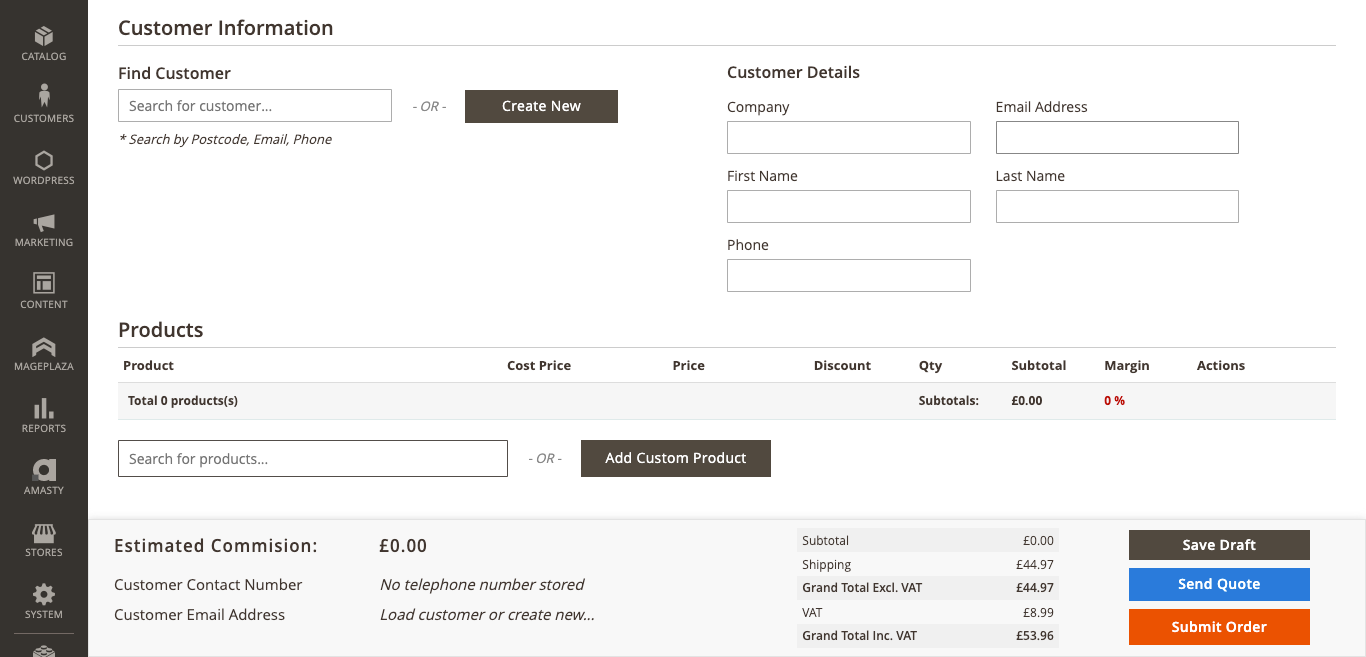
We’ve reinvented Magento MOTO
After a decade of working with eCommerce and MOTO admins, we've added the tools to make managing eCommerce customer service a dream. We know because we've consulted many of you whilst building this product.
MOTO orders
The ODB makes taking day-to-day orders a breeze. With one page PCI compliant MOTO ordering and seller tools such as:
- Intelligent matching
- Postcode lookup
- Related products
- Custom products
- Percentage based discounts
- Per product line comments
Drafts and quotes
The customer needs to leave the call or come back later. The default is to clear your screen or open another tab.
ODB lets you save drafts and recall them later or you can choose to send a quote from the Magento admin with just one click.
Send a payment link
Customers can checkout orders directly from their email using ANY payment gateway you have installed on your front-end.
Including ApplePay, Klarna, Hokodo or other payment gateways you cannot use over the phone.
Process orders faster
The ODB is fast. Really fast. Just one screen to create and complete orders and quotes.
Everything your agents need on one screen. Instantly.
Admins can now place an entire order from start to finish on a single screen. Lookup or create a customer, add products, payment and shipping details without changing screens or tabs.
Lightning-fast customer and product searches
The ODB’s advanced search allows you to search products or customers with intelligent matching. Search multiple keywords at once, recognising customers and products faster.
On-the-fly validation reduces repetition
Have you ever spent 10 minutes filling in a complex order, only to discover "Customer already exists" and you have to start again? On-the-fly lookups validate data as you type and highlights issues.
Want to see The ODB in action?
Let’s chat!
Process orders smarter
Vital intelligence, customer data and product knowledge is captured and shared by your eCommerce store every day.
The ODB makes this data available to agents so they can offer the highest levels of customer service with reduced training.
Shared product and consumer knowledge
Agents can now see what Customers Also Bought* as well as related products, draft quotes and recent orders from the order screen.
Purchasing behaviour data from both the front and backend informs agents to offer better product advice to customers.
Bulk add options of configurable products
In trade & B2B environments it's commonplace for multiple sizes and colours of products to be ordered at once. The ODB offers a smart and faster way to place bulk orders.
CRM features for customer management
The ODB is suitable for inbound and outbound order taking because of its CRM like lookup and usability. If a customer matches when you search you'll find all of their contact details presented if not, then you'll be able to create them right there and then.
Easy PCI compliance of MOTO
Customer Not Present (CNP) and Mail Order/Telephone Order (MOTO) compliance are easier and more secure with ODB as sensitive data never leaves the sales environment.
Direct input of payment details
With ODB you directly enter customer payment details into the sales system. No paper, no terminals, no separate screen or tabs.
Pause call recordings when taking payment
Enable payment pause reminders when sensitive data is being transferred over the phone. Hook in a browser extension to make call pausing automatic*
Faster, easier reconciliation
Every order is directly tied to its credit or debit card transaction. There is no need to balance card terminals or virtual terminals with your orders
Know which agents have handled any sensitive data
All orders are associated with the admin login that took payment. If any breach or complaint is raised you are easily able to trace back to who handled the data and when.
Make changes after taking payment details
With The ODB you can make changes after setting shipping and payment details.
Payment features
The ODB adds common payment feature requests by merchants as standard.
Backend only payments
Easily control which payments are available to agents and which appear on the front-end checkout for customers.
Combined with "Quotes & Payment Links" the versatility is now endless.
Use any payment gateway you choose
Use all of your payment options in The ODB.
If they are front-end only solutions such as e-wallets from ApplePay or Google Pay you can send a payment link for customers to safely checkout.
The ODB supports almost any payment provider including:
Used by the world's leading companies





Most popular features
A quick overview of the most popular features and tools available in The ODB
Customers
- Easy customer creation
- No more "customer already exists"
- See customer contact info
- Supports Company Accounts
- Easy company creation
- See open orders, drafts & quotes
Want to arrange a demo of The ODB™ ?
Agents love The ODB™
Do you use the Magento order screen regularly? This section is just for you. We know your annoyances, we know those quirks and we know how it makes you feel
No more "Customer Already Exists" errors
5 minutes into an order, address and card details are taken, you click "Place Order" and... the customer already exists. ARRGGHHH!!!! No more. The ODB validates customers as you type.
No more secret voucher codes
Do you keep a list of secret voucher codes for giving a 10% discount, free delivery or other incentives? With ODB you can enter discounts quickly and easily line by line. No more remembering codes or having to fix voucher codes in the middle of an order.
Remembers shipping and payment details when you make changes
The dreaded "oh actually" when you've taken payment details and confirmed shipping. The customer wants to change something on their order and you have to write everything down on a notepad. Keep your PCI compliant and customers happy. ODB remembers everything until you are finished.
Actually "adds" the products to the order
When you choose items to add to the order in ODB there is no need to click another button to say "add to order". When you select a product you want on the order, it's actually added, the first time, every time.
Save drafts and avoid multiple open tabs
You're afraid to close a screen because the customer needs to call back, get a payment card, wants to check something and by lunchtime you have 20 tabs and the system is going slow. No more. Save your orders as drafts and recall them later when the customer calls back OR send them their order/quote via email. They can then edit and checkout when they are ready.
Want to see The ODB™ in action?
Let's chat!
Better than your ERP order screen
The ODB avoids the risk of underpricing, lack of permissions and bad practice when placing orders directly into your ERP.
Immediate customer visibility
Not all ERPs are connected with a two-way sync. Entering all orders quickly and easily into the CMS allows your customers to see every order they have placed in their My Account section, with no additional development work.
Take control of discount amounts and margins
Does your ERP allow you to restrict discount amounts, set minimum margins or hide cost prices?
The ODB gives negotiation tools to your sales agents with rules and limits.
Access anywhere without additional license fees
Most ERPs charge for additional user licenses, and even more for cloud access. The ODB is part of your website and by its very nature is cloud based.
Reduce integration costs
It is often far cheaper to customise your website than your ERP. The ODB is built using standard coding practices and is highly extensible.
FAQs
MOTO means Mail Order Telephone Order and has typically come to mean orders that are placed by phone, email, fax or post rather than via a website or in person over a counter.
Duhring a MOTO order, a customer is not physically present. For credit and debit card payments, this changes things as a client is not able to complete a Chip & Pin, signature or 3d Secure details.
It's easy to enhance
The ODB™ further
We recognise that every business is different. The ODB is designed to be customisable for
individual requirements.
CRM & ERP Enrichment
It is possible and made easy to add data from your CRM or ERP to the ODB dashboard to enhance the sales experience.
Pull in additional customer information, stock location, serial numbers or any combination of data.
Custom API Integrations
Do your suppliers and manufacturers have additional data via an API? Fact sheets, COSH documents? Any information available to you via an API can now be added to the order screen.
Book a demo
After your personal demo, you will know if The ODB is a good fit for your business and have access to a free demo test site where you can test all the features in great detail.